Print customers' files without ever holding them.
Customers send documents sealed from their phone. Your counter device prints them straight to your copier. No WhatsApp, no downloads folder, nothing private left behind.
- 3F8A14 pages, color, double-sidedFor pickup
- 7K2Q2 pages, black and whiteWaiting for the customer's code
- 9C1D1 page, color, A3Printed
The WhatsApp way costs you too
A phone full of strangers' IDs
Every passport and bank letter you print stays in your chats and gallery. That's a risk you carry for nothing.
Time lost at the counter
Finding the right chat, downloading, renaming, asking for the file again. Every order, every day.
Your number on every flyer
Your personal or shop number becomes the inbox for every document in the neighborhood.
What chat printing costs you
Move the sliders to match your shop. The result uses only your numbers.
17.3hours a month back at the counter
520customer documents a month that never land on your phone
Finding the chat, downloading, renaming, asking again and deleting: with SafePrint, none of it happens.
Set up in three steps
- 1
Get the app
Install SafePrint on the phone or tablet at your counter and choose “I run a copy center” in Settings.
- 2
Add your shop
Name, address, opening hours and your prices per printed side. We check every copy center before customers see it.
- 3
Connect your copier
The app finds your copier on the shop Wi-Fi. From then on, orders arrive in the queue.
What you need
- A phone or tablet at the counter (iPhone or Android)
- Shop Wi-Fi
- A network copier that prints PDF, JPEG and PNG over IPP. Most office copiers from the last ten years do.
Free while we launch
No fees for copy centers during the launch. If that ever changes, we'll tell you in the app at least 30 days before, and you can stop any time.
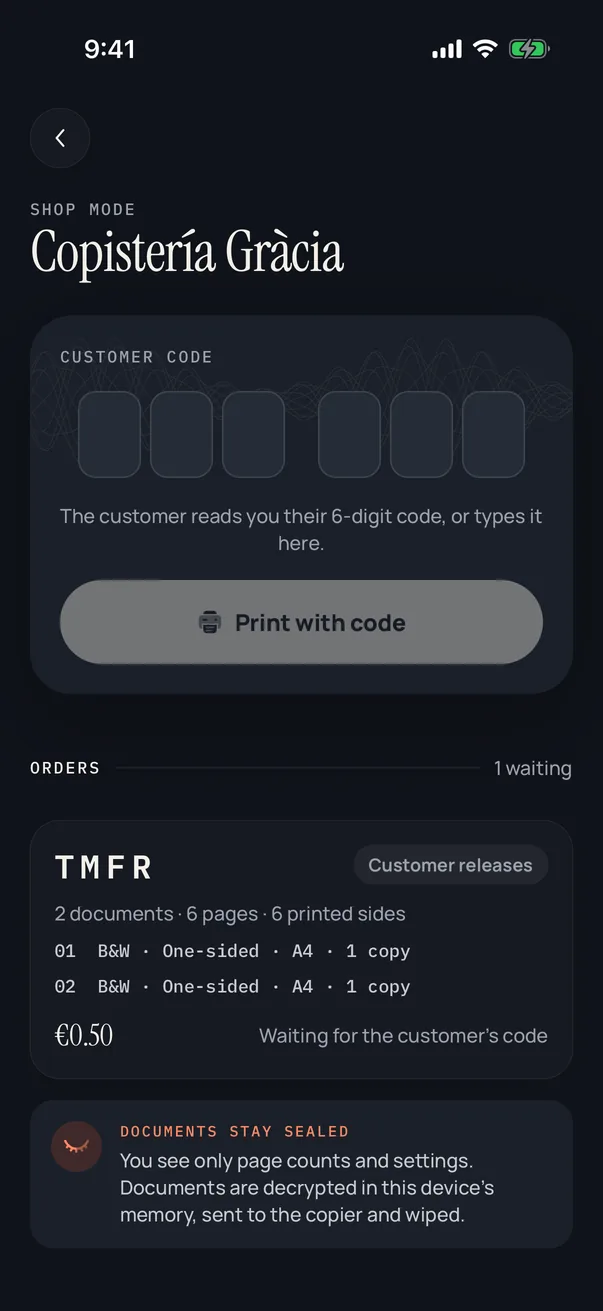
What you and your staff see
- An order number and page count
- Print settings and the price
- A Print button, or a field for the customer's code
What you never handle
- The file itself
- Its name
- Who the customer is
- Anything to delete afterwards
Questions from copy centers
Do I need a computer?
No. The phone or tablet at your counter does everything: it receives orders and sends them to the copier over Wi-Fi.
How do customers pay?
At your counter, as they do today, at the prices you set in the app. SafePrint doesn't take payments.
Can I set my own prices?
Yes. A price per printed side for black and white and color, for A4 and A3, and a minimum order, in euros or Turkish lira.
What if a print fails?
The order goes back to the queue and you can print it again. The customer can also cancel it at any time.
Can my staff open the documents?
No. The documents are decrypted only inside the counter device's memory, sent to the copier and wiped. Staff see the order, never the file.
Why do you approve copy centers?
So customers can trust that every shop in the app is real. Changes to your name, address or location are checked again.
Ready when your customers are.
Install the app and choose “I run a copy center” in Settings.
Get one email when SafePrint launches
No newsletter. One email when the app is in the stores, then we delete your address.